
School ERP for modern private schools
Run your school from one simple system.
Admissions, students, fees, attendance, staff, transport and communication, connected in one school-ready platform.
- Role-based access
- Audit trail
- Secure document storage
- Onboarding4 to 7 day target
- AccessRole-based permissions
- SecurityProtected documents
- AccountabilityAuditable activity trail
- PlatformWeb + desktop application
The problem
Stop managing school operations across disconnected tools.
Most schools are not short of software. They are short of one place where admissions, fees, attendance and staff records agree with each other.
Fragmented tools
Admissions in one place, fees in another, attendance on paper. Nothing reconciles without someone doing it by hand.
Complex systems
School teams need software that matches how a school actually runs, not a system built for a different industry.
Slow implementation
A new ERP should not become a long technology project that pulls your staff away from running the school.
Low visibility
Administrators need one operational view instead of chasing updates across registers, files and spreadsheets.
Platform overview
Everything your school team needs, connected in one place.
Eight modules built around one operational core. A record created in admissions is the same record that fees, attendance and transport work from.
One system
School operations
Every module reads and writes the same record. An enquiry becomes an admission, the admission becomes a student, and fees, attendance and transport all work from that one file — nothing is re-keyed between departments.
- Enquiry
- Admission
- Student
- Fees & attendance
- Modules
- 8
- Student record
- One
Admissions
Turn enquiries into organised admissions.
Students
One complete student record.
Finance
Know what is collected, due and overdue.
Attendance
Make attendance simple for staff.
HR & Payroll
Transport
Communication
Reports
How it connects
From first enquiry to a working student record.
One journey, handled end to end. Every step passes its information to the next, so nothing is re-typed and nothing is lost between departments.
Capture enquiry
A walk-in or call becomes a tracked enquiry, not a note in a register.
Convert to admission
The enquiry carries its details forward. Nothing is typed twice.
Collect information
Student and parent details are completed against required fields.
Upload and verify documents
Documents are checked off a list and stored privately.
Approve admission
An authorised user approves. The decision is recorded.
Create student record
The student and admission number are generated automatically.
- 7
Continue into operations
Fees, attendance and transport pick up the same record.
- Complete
- Active
- Upcoming
Module showcase
Every module, on the screen your team will actually use.
Each module handles one part of school operations and hands off cleanly to the next.
Turn enquiries into organised admissions.
Every enquiry moves along one track — application, documents, approval — so nothing sits in a register waiting for someone to remember it.
- Capture enquiries from walk-ins, calls and referrals
- Convert an enquiry to an admission without re-typing details
- Collect and verify documents against a checklist
- Approve admissions and generate the student record
One complete student record.
Parents, academics, fees, attendance and documents on a single profile, so any staff member with the right permission gets a straight answer.
- Profile with parent and guardian contacts
- Class and section history across academic years
- Fee status, receipts and concessions in context
- Documents stored against the student, not a shared drive
Know what is collected, due and overdue.
Fee heads, structures and instalments configured once, then collection and receipts run against them for the whole year.
- Fee heads, structures and instalment schedules
- Collect fees and issue numbered receipts
- Track dues and overdue balances by class or student
- Record concessions and expenses alongside collection
Make attendance simple for staff.
Marking a class takes a moment, and the day rolls up into summaries administrators can actually use.
- Mark a full class from one screen
- Daily, monthly and per-student summaries
- Staff attendance alongside student attendance
- Export attendance for reporting periods
Manage staff from joining to payroll.
Employee records, designations, leave and payroll in the same system that already knows your school structure.
- Employee records with designation and joining details
- Leave types, balances and approvals
- Payroll runs built from the employee record
- Role and permission assignment for system access
Keep routes, drivers and students connected.
Vehicles, drivers, routes and stops defined once, then students assigned to the stop they actually use.
- Vehicle and driver records
- Routes with ordered stops
- Student-to-stop assignment
- Transport fees linked to the student record
Reach parents through familiar channels.
Send to a class, a section or a filtered list over WhatsApp, SMS and email, and keep a record of what went out.
- WhatsApp, SMS and transactional email
- Send to a class, section or filtered group
- Templates for recurring notices
- Delivery record against each send
Turn daily records into usable reports.
Filter the records the school already captures, review them on screen, and export when someone needs a copy.
- Filter by class, section, date range and status
- Collection, dues and attendance reporting
- Review on screen before exporting
- Export for management and audit requirements
One operational view
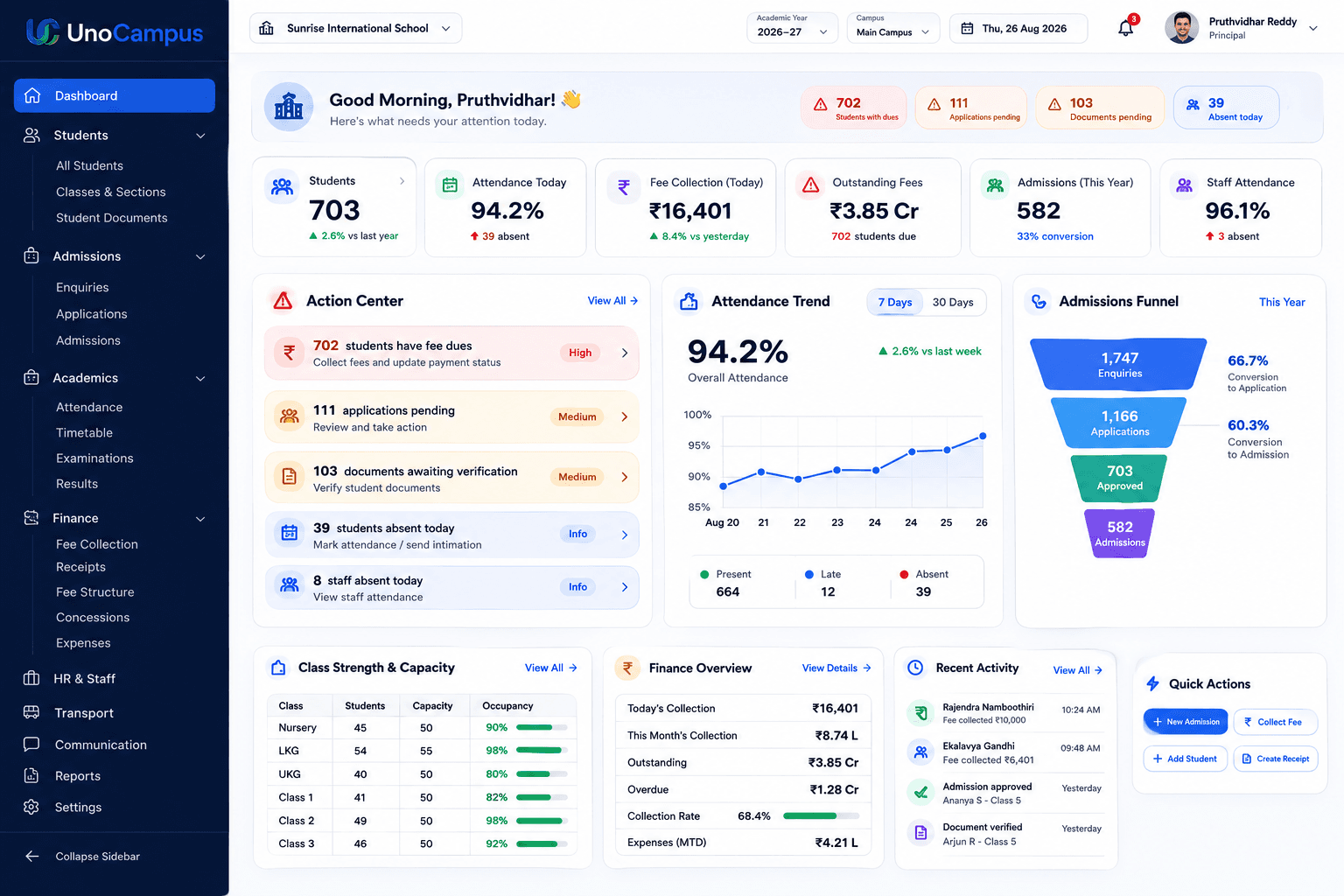
The whole school, on one screen.
Admissions in progress, collection against schedule, attendance across sections — visible without asking anyone to compile it.
Role-based experience
Everyone gets their own view of the school.
Permissions decide what each person sees and does. The same system serves the front desk, the staff room and the principal's office without showing any of them the others' work.
See the whole school and control daily operations.
The administrator's dashboard brings admissions, collection, attendance and staff activity into one view, with the permissions to act on any of it.
- Full operational dashboard
- User and role management
- Every module in one place
Fast onboarding
From signed agreement to school-ready in days, not months.
A new ERP should not become a long technology project. Five steps, run by our team alongside yours, with a 4 to 7 day target from agreement to go-live.
4–7
day target
5
steps to go-live
- 01
School setup
Your school, academic year, classes and sections are configured to match how you already operate.
- 02
Master data
Fee heads, structures, designations, leave types and transport routes are set up once for the year.
- 03
Users & roles
Staff accounts are created and each role is given exactly the permissions it needs.
- 04
Data readiness
Existing student and staff records are prepared, imported and checked against your registers.
- 05
Go live
Your team starts working in the system with support on hand through the first collection cycle.
The target assumes your existing student and staff records are available in a workable form. We confirm what is needed before the clock starts, so nothing waits on a surprise.
See how it worksSecurity and privacy
Built so the right people see the right records.
School data is personal data. These are the controls that decide who reaches what, and how that access is recorded.
Role-based access
People see and do only what their role permits. A teacher marking attendance does not reach fee collection, and a receptionist capturing enquiries does not reach staff payroll.
School isolation
School operational data is scoped to the correct school. In a multi-school group, each school's records stay within that school unless a role is explicitly granted a wider view.
Audit trail
Important changes can be traced to the user who made them, the time they were made and the originating IP address, so a question about a record has an answer.
Document protection
Private files are not served from public URLs. They are accessed through authorised, short-lived links generated for a permitted user at the moment they open the document.
Authentication
Password authentication with an OTP foundation and session controls, so access can be granted, reviewed and withdrawn as staff join and leave.
Data privacy
The platform is built with the Digital Personal Data Protection Act, 2023 as a design objective. Our privacy policy sets out what is collected, why it is held and how long it is kept.
FAQ
Questions schools ask first.
The ten questions we hear most are answered in full on the FAQ page.
We target 4 to 7 days from signed agreement to go-live. The work is school setup, master data, users and roles, and data readiness. Schools that have their existing records in reasonable order move fastest, and we tell you what we need up front so nothing waits on a surprise.
Ready to simplify school operations?
Tell us your school size and the modules that matter most. We will walk you through the platform against your own operations, not a generic tour.
Book a demoAlready a customer? Login